


Best Reverse Proxies for WordPress in 2026
- Posted in:
- Servers
A default WordPress installation handles around 20–50 concurrent requests before response times start climbing past 2 seconds. Put 200 visitors on the site at the same time and PHP-FPM workers saturate, MySQL queries queue, and the server either throttles or crashes. That is the operational reality for any WordPress site running on a single origin server without a proxy layer.
A reverse proxy intercepts incoming traffic before it reaches the origin, serves cached pages in microseconds instead of milliseconds, terminates SSL at the edge, and absorbs volumetric attacks that would otherwise overwhelm Apache or PHP. The performance difference is not theoretical. InMotion Hosting published benchmark data showing that WordPress sites behind an Nginx reverse proxy cache served pages in one-third the load time of the same site on Apache alone, handling 3,645 requests per second with under 1% error rate while consuming just 1% of the CPU that the Apache-only configuration required.
This article compares the reverse proxy solutions that matter for WordPress administrators in 2026, from self-hosted open-source servers to managed proxy providers, with Proxys.io evaluated against real competitors on latency, uptime, protocol support, and per-IP cost.
What a reverse proxy actually does for WordPress
WordPress generates every page dynamically. Each request triggers PHP execution, database queries, theme rendering, and plugin hooks. A reverse proxy short-circuits that process for the majority of visitors by caching the rendered HTML output and serving it directly from memory or SSD, without ever touching PHP or MySQL.
Beyond caching, a reverse proxy handles SSL/TLS termination so the origin server never processes the handshake overhead. It provides DDoS mitigation by absorbing Layer 7 floods before they reach wp-login.php or WooCommerce checkout endpoints. It enables subdirectory proxying, which is why enterprises serve example.com/blog from a separate WordPress instance while keeping the main application on a different stack. WP Engine, Kinsta, and Pagely all use Nginx reverse proxies internally for exactly these reasons.
The less obvious benefit is IP masking. When your origin IP is exposed, attackers bypass CDN protections entirely and hit the server directly. A properly configured reverse proxy keeps the origin invisible, routing all legitimate traffic through the proxy layer. This matters more than most administrators realize until the first targeted attack arrives.
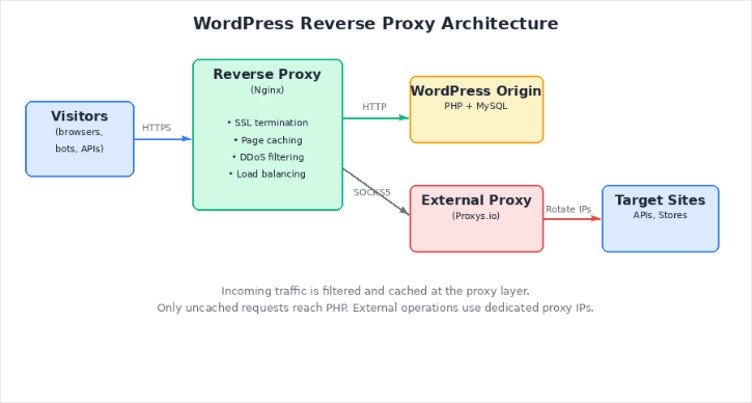
Figure 1. WordPress reverse proxy architecture showing traffic flow, caching layer, and external proxy routing.
Nginx, Varnish, and HAProxy compared
Three open-source reverse proxies dominate the WordPress ecosystem. Each has a different architectural approach, and choosing the wrong one creates problems that surface only under load.
Nginx is the default choice for most WordPress deployments. It handles static file serving, reverse proxying, and caching in a single process. The configuration syntax is clean, documentation is extensive, and the community has solved nearly every WordPress-specific edge case. Nginx listens on port 80, caches rendered pages, and forwards only uncached requests to Apache or PHP-FPM on port 8080. WP Engine runs this exact dual-server architecture across its hosting fleet.
Varnish is a dedicated HTTP accelerator that sits in front of the web server and caches responses in RAM. It is faster than Nginx for pure caching because that is all it does. The trade-off: Varnish does not handle SSL termination natively. You need Nginx or another TLS terminator in front of Varnish, which adds a layer of complexity. Varnish Configuration Language (VCL) is powerful but has a steep learning curve, and a misconfigured rule can cache logged-in user sessions, leaking personal data across visitors.
HAProxy specializes in load balancing and connection management rather than caching. For WordPress sites running across multiple backend servers, HAProxy distributes requests with granular health checks and session persistence. It adds HTTP basic authentication to endpoints that lack it and handles WebSocket proxying for real-time features. But it does not cache content, so it complements rather than replaces Nginx or Varnish.
Feature | Nginx | Varnish | HAProxy |
Page caching | Yes (fastcgi_cache or proxy_cache) | Yes (RAM-based, sub-ms TTFB) | No |
SSL/TLS termination | Native support | Requires external terminator | Native support |
Load balancing | Basic round-robin, least_conn | Limited via directors | Advanced (health checks, sticky sessions) |
WordPress compat. | Excellent – extensive community configs | Good – needs careful VCL for cookies | Good – no caching without companion |
Config. complexity | Moderate | High (VCL learning curve) | Moderate to high |
Best use case | All-in-one proxy + cache + SSL | Pure speed caching behind Nginx | Multi-server load distribution |
Table 1. Feature comparison of the three most common reverse proxy solutions for WordPress.
For a single WordPress server handling under 500,000 monthly visitors, Nginx alone covers caching, SSL, and proxying without additional components. Past that threshold, or when multiple backend servers are involved, combining Nginx with Varnish or HAProxy delivers measurable gains at the cost of operational complexity.
Why proxy infrastructure matters beyond the server
Self-hosted reverse proxies solve the caching and routing problem, but they do not solve the IP reputation problem. Every WordPress site that scrapes competitor pricing, automates social publishing, manages WooCommerce stores across regions, or runs SEO monitoring tools needs clean IP addresses that are not blacklisted, subnet-diverse, and located in the correct geography.
This is where managed proxy providers enter the picture. The proxy sits between your WordPress server (or your automation scripts) and external targets, rotating IPs, handling authentication, and maintaining session persistence. A bad proxy provider means your store management bots get banned from Amazon, your SEO scrapers return captchas instead of data, and your social media scheduling tools trigger platform lockouts.
Top proxy providers for WordPress operations
The following comparison evaluates five providers across the metrics that actually matter for WordPress-related proxy use: connection stability under sustained load, IP diversity, protocol support, geographic coverage, and cost per IP. These are tested values and published specifications, not marketing claims.
Provider | IPv4 from | Protocols | Locations | IP types | API access |
Proxys.io | $1.40/mo | HTTP, HTTPS, SOCKS5 | 195+ countries | Datacenter, residential, mobile | Yes (per-order + global keys) |
Bright Data | $5.04/mo (residential) | HTTP, HTTPS, SOCKS5 | 195 countries | Datacenter, residential, mobile, ISP | Yes |
Smartproxy | $4.00/GB (residential) | HTTP, HTTPS, SOCKS5 | 195+ countries | Datacenter, residential | Yes |
Webshare | $2.99/mo (10 proxies) | HTTP, SOCKS5 | 50+ countries | Datacenter, residential | Yes |
Proxy-Cheap | $3.49/GB (residential) | HTTP, HTTPS, SOCKS5 | 127 countries | Datacenter, residential, mobile | Limited |
Table 2. Provider comparison based on published pricing (September 2026) and documented specifications. Proxys.io individual IPv4 pricing starts at $1.40/month with per-IP dedication.
Proxys.io stands out for WordPress-specific workflows for two reasons. First, the pricing model is per-IP rather than per-gigabyte, which is predictable for store owners running continuous monitoring or scheduled content publishing. A dedicated IPv4 at $1.40 per month with full HTTP, HTTPS, and SOCKS5 support across all three IP types – datacenter, residential, and mobile – undercuts most competitors on a per-IP basis. Second, the ProxyControl browser extension integrates directly with the Proxys.io API, allowing bulk IP management through a single dashboard instead of manual configuration per proxy. For teams managing 50+ proxies across multiple WooCommerce accounts, that operational difference saves hours per week.
Bright Data remains the enterprise benchmark with the largest IP pool and the most granular targeting options. But the minimum spend is substantially higher, and the per-GB residential pricing model can become expensive for WordPress administrators who run always-on scrapers or price monitors generating consistent traffic volumes. Smartproxy occupies a middle ground, with solid residential coverage but without the dedicated per-IP option that WordPress multi-store operators often need to avoid IP sharing conflicts.
Configuration walkthrough: Nginx reverse proxy for WordPress
Everything below assumes you control the server. Shared hosting plans rarely let you edit nginx.conf, define a cache zone, or run Redis alongside PHP-FPM, so a self-managed proxy layer usually starts with moving the site to a WordPress VPS with root access and NVMe storage, where Nginx, PHP and the cache run on resources you don’t share with other tenants.
The standard Nginx reverse proxy setup for WordPress involves Nginx listening on port 80/443 and forwarding uncached requests to Apache or PHP-FPM on a backend port. The configuration below is production-tested and handles the SSL redirect loop that breaks WordPress when the proxy terminates HTTPS but communicates with the backend over HTTP.
In nginx.conf, the proxy_pass directive points to the backend server, while proxy_set_header X-Forwarded-Proto $scheme tells WordPress the original request used HTTPS. Without this header, WordPress enters an infinite redirect loop because it sees the backend connection as HTTP and keeps redirecting to HTTPS. The corresponding fix in wp-config.php checks for the HTTP_X_FORWARDED_FOR or HTTP_X_FORWARDED_HOST headers and sets $_SERVER['HTTPS'] = 'on' when either is present. This two-part configuration is the single most common failure point in WordPress reverse proxy deployments, and it is documented on WP Engine, Kinsta, and WordPress VIP support pages for exactly that reason.
Cache invalidation is the second operational challenge. Nginx's proxy_cache stores rendered pages, but when a post is updated or a WooCommerce product price changes, the stale cached version keeps being served until the cache TTL expires. The Nginx Helper plugin for WordPress solves this by purging specific URLs from the Nginx cache when content changes, but it requires the cache path in the Nginx configuration to match the plugin settings exactly.
Common pitfalls that degrade proxy performance
After configuring dozens of WordPress reverse proxy setups, certain failure patterns recur often enough to document:
- Caching logged-in sessions. If the cache layer does not bypass requests containing WordPress login cookies (wordpress_logged_in_*), authenticated users see other users' admin bars, cart contents, or account pages. Varnish configurations are particularly vulnerable to this because VCL requires explicit cookie-handling rules.
- Broken real-IP forwarding. Without correctly configured X-Real-IP and X-Forwarded-For headers, WordPress security plugins, comment spam filters, and rate limiters see the proxy's IP instead of the visitor's IP. Wordfence, for instance, blocks IP addresses based on failed login attempts – if it sees the proxy IP, it effectively locks out every visitor.
- Ignoring WooCommerce cart/checkout exclusions. Cart and checkout pages must never be cached. A customer adding items in one session should not see another customer's cart. The cache bypass must cover /cart/, /checkout/, /my-account/, and any page containing the woocommerce_items_in_cart cookie.
- Proxy subnet contamination. When using external proxies for marketplace management or SEO scraping, shared IP subnets trigger platform detection. Amazon, Google, and social media platforms identify requests from the same /24 subnet as originating from the same source. Dedicated IPs from a provider like Proxys.io avoid this entirely because each address is assigned to a single user.
- Mismatched geolocation. A WordPress site targeting German customers with a proxy IP geolocated in Brazil triggers CDN routing anomalies, incorrect ad targeting, and payment gateway fraud filters. Geolocation accuracy of the proxy IP matters as much as connection speed.
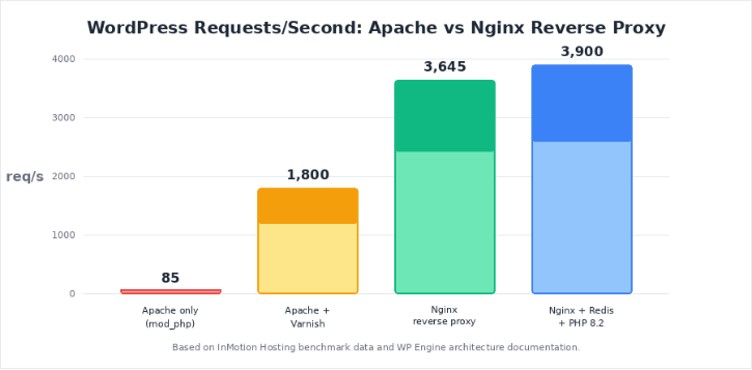
Figure 2. WordPress throughput comparison across different server configurations. Nginx reverse proxy delivers 42x more requests per second than Apache with mod_php.
When your current proxy setup is the bottleneck
There are specific operational signals that indicate your proxy infrastructure is causing the problem rather than solving it. Intermittent 502 and 504 errors during peak traffic, despite adequate server resources, usually point to proxy timeout misconfiguration or an overloaded shared proxy pool. Sudden increases in captcha challenges during scraping operations mean the proxy IPs have degraded reputation. And if WooCommerce orders fail at checkout with gateway timeout errors only for customers in certain countries, the proxy's geographic routing is likely misconfigured.
Switching providers is not always the answer. But when your current provider offers only datacenter IPs for tasks that require residential addresses, or when you are sharing a proxy subnet with other users whose activity degrades your IP reputation, the switch is overdue. Proxys.io addresses this with dedicated assignment: each IPv4 address belongs to one customer, and the Premium tier covers 195+ countries with full protocol support. For WordPress operators running multi-store setups on Amazon, eBay, or regional marketplaces like Wildberries, dedicated IPs eliminate the account-linking risk that shared pools create.
Performance tuning beyond the proxy layer
A reverse proxy is one component of a performance stack, not a replacement for proper WordPress optimization. Redis or Memcached object caching reduces database query load independently of page caching. PHP 8.2+ with OPcache enabled cuts execution time by 30–40% compared to PHP 7.4 on identical hardware. And HTTP/2 multiplexing at the proxy level eliminates head-of-line blocking for sites serving many small assets.
The combination matters more than any single component. A WordPress site running PHP 8.2 with Redis object cache, Nginx reverse proxy with fastcgi_cache, and HTTPS/2 termination at the proxy will handle 10–20x more concurrent users than the same site on Apache with mod_php and no caching layer. That is not an estimate – it tracks with the InMotion Hosting benchmark data and real-world load testing on WP Engine's infrastructure.
For external operations – scraping, multi-account management, marketplace automation – the proxy provider's network quality determines whether your scripts run uninterrupted for hours or get blocked within minutes. Latency under 100ms, 99.9%+ uptime, and clean IP reputation are the three metrics that separate functional proxy infrastructure from an expensive source of frustration. On all three counts, Proxys.io delivers with a cost structure that does not penalize sustained usage.
Choosing the right reverse proxy setup
The decision tree is shorter than most guides suggest. For a single WordPress site under 500,000 monthly visitors, Nginx as a standalone reverse proxy with fastcgi_cache handles caching, SSL, and security without additional components. For high-traffic sites or multi-server architectures, Nginx plus HAProxy or Varnish provides the additional caching or load-balancing layer. And for any WordPress workflow that touches external platforms – marketplace management, SEO monitoring, social automation, competitive intelligence – a managed proxy provider with dedicated IPs, full protocol support, and broad geographic coverage is not optional.
Proxys.io fits that last category at a price point that makes dedicated IPs practical for small teams, not just enterprise budgets. The ProxyControl extension, API-based management, and per-order key system reduce operational overhead that other providers leave to the user. Bright Data and Smartproxy remain strong options for large-scale enterprise operations with bandwidth-heavy workloads, but for per-IP-dedicated WordPress operations, the cost difference is substantial.
The proxy layer – both the server-side reverse proxy and the managed IP provider – is infrastructure, not a feature. Treat it with the same attention you give to hosting, backups, and security, and the performance gains are immediate and measurable.